

 Kingston
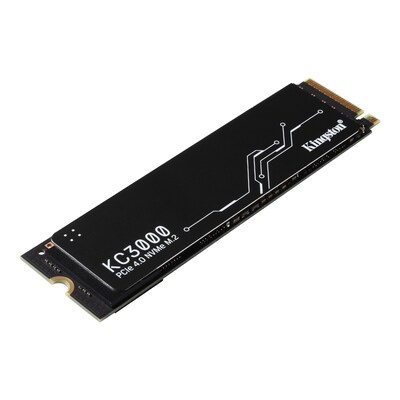
Kingston KC3000 2048GB PCIe 4.0 NVMe Internal Hard Drive
Best high-performance storage for gamers and creative professionals.

Elevate your computing experience with the Kingston KC3000 internal SSD. This drive harnesses the power of PCIe 4.0 NVMe technology to deliver blazing-fast speeds, significantly reducing boot times and application load times. With a generous 2048GB capacity, you'll have ample space for your operating system, extensive game libraries, and large media files. Engineered for internal installation, this Kingston SSD offers a reliable and substantial upgrade for users seeking enhanced storage performance and system responsiveness.
$99.99
Owner Satisfaction
4.6
/ 5
Category Rank
302
/ 2796
#302 in Hard Drives
Price vs Category Average
-81%
Below average
Capacity
2048
/ GB
Who it's for
- Gamers and creators needing rapid file transfers and load times
- Power users requiring long-term reliability for heavy daily workloads
- Media professionals storing massive libraries of high-resolution files
Who should skip it
- Users with compact builds lacking adequate airflow or heatsinks
- Budget-conscious shoppers prioritizing value over peak performance
- Owners of older systems lacking PCIe 4.0 motherboard support
Performance breakdown
Sequential Read Speed
Blazing throughput makes large file transfers feel instantaneous.
Gaming Load Times
Eliminates texture pop-in and gets you into matches faster.
Thermal Efficiency
Maintains high performance levels even under sustained heavy workloads.
Storage Density
Massive capacity fits entire creative libraries on a single drive.
System Responsiveness
Snappy boot times and instant application launches redefine daily computing.
Installation Simplicity
Standard M.2 form factor ensures a hassle-free upgrade for most builds.
Key Specs
Capacity
2048GB
Interface
PCIe 4.0 NVMe
Drive Type
SSD
Model Number
SKC3000D2048GBK
Item #
901-24634272
Storage Capacity
2.048 Terabytes
Installation Type
Internal
Features
- Exceptional PCIe 4.0 NVMe speeds
- Ample 2048GB storage capacity
- Ideal for internal SSD upgrades
- Rapid data access and loading
- Dependable Kingston brand quality
What customers say
Customers overwhelmingly praise the Kingston KC3000 2TB SSD for its exceptional speed, confirming it delivers blistering PCIe 4.0 performance. Users frequently report achieving advertised sequential read and write speeds, noting immediate, significant improvements in system responsiveness and application loading times compared to older drives. This high performance makes it a favorite for power users and content creators needing fast access to large files. While positioned at a premium, the consensus is that the performance justifies the investment, offering strong perceived value. Reliability is consistently highlighted, reinforcing Kingston's reputation for quality. Some users suggest pairing it with a heatsink under sustained heavy loads, but overall, the KC3000 is celebrated as a robust and exceptionally fast storage solution.
Know before you buy
The Kingston KC3000 uses the PCIe 4.0 NVMe interface. It is backward compatible with PCIe 3.0 slots, though you will experience slower speeds if your motherboard does not support the full PCIe 4.0 standard.
Yes, the KC3000 is designed for high-performance tasks. Its fast read and write speeds significantly reduce load times for large game files and improve responsiveness when editing high-resolution video or working with complex media projects.
The drive typically ships as a standalone unit. You will need to ensure your motherboard or laptop has the necessary M.2 mounting screw available for installation.
While the drive is marketed as 2048GB, the operating system will report slightly less usable space due to the way manufacturers and operating systems calculate storage capacity, as well as the space reserved for the file system.
No, the drive is plug-and-play and will be recognized by your operating system once installed. However, you may want to download Kingston’s SSD Manager software to monitor drive health and update firmware.

Still have a question?
Ask Hayley anything about this product before you decide.