


 Elgato
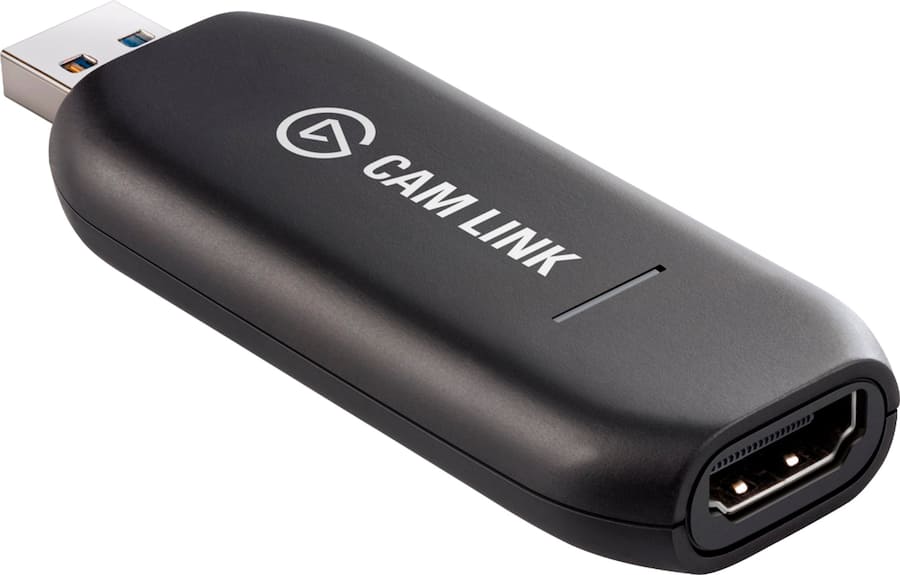
Elgato Cam Link 4K Standard
Best capture device for streamers upgrading to professional camera quality.

Elevate your content creation with the Elgato Cam Link 4K Standard. This capture device seamlessly connects your HDMI camera to your computer via USB 3.1 Gen 1, allowing you to stream or record in stunning clarity. It supports resolutions up to 3840 x 2160 at 30 frames per second, leveraging the professional quality of your existing camera. Its plug-and-play design ensures effortless setup for both Windows and Mac users, making it an essential tool for enhancing your broadcasts or recordings.
$100.00
More Cam Link Options
Owner Satisfaction
4.7
/ 5
Category Rank
6
/ 235
#6 in Video Editing Hardware & Production Equipment
Price vs Category Average
-94%
Below average
Input Interface
HDMI
/ HDMI
Who it's for
- Content creators seeking professional-grade visual fidelity
- Streamers needing quick, hassle-free software integration
- Live broadcasters requiring real-time, lag-free video performance
Who should skip it
- Action-oriented gamers needing high-frame-rate 4K capture
- Long-form streamers worried about thermal stability
- Users without compatible cameras or external power accessories
Performance breakdown
Video Fidelity
Delivers crisp 4K output that maximizes your camera's native sensor quality.
Setup Simplicity
True plug-and-play functionality makes professional streaming accessible to absolute beginners.
Latency Performance
Minimal signal delay ensures your audio and video remain perfectly synced.
Software Compatibility
Seamless integration with industry-standard broadcasting suites like OBS and vMix.
Form Factor
Compact, portable design fits easily into any mobile or desktop setup.
Reliability
Consistent performance during long recording sessions without overheating or signal drops.
Key Specs
Input Interface
HDMI
Output Interface
USB Type-A
Bus Type
USB 3.1 Gen 1
Maximum Input Resolution
3840 x 2160
Maximum Frame Rate
30 fps (at 4K)
Supported OS
Windows and Mac
Number of Inputs
1
Product Type
Capture Device
Features
- Capture video up to 4K resolution at 30fps
- Easy setup with plug-and-play functionality
- Leverages the quality of your existing camera
- Compatible with Windows and Mac systems
- Stream or record high-quality HDMI signals
- Includes necessary USB extension cable
What customers say
The Elgato Cam Link 4K is viewed as an essential upgrade for content creators seeking superior video quality. Customer satisfaction centers on its reliable plug and play functionality and the dramatic image fidelity improvement when using a DSLR or mirrorless camera. Setup is consistently praised for being instantaneous across major operating systems and streaming platforms, making it highly accessible. The core value is capturing clean, uncompressed video up to 4K resolution. While the price is noted, reviewers agree the performance and stability surpass cheaper alternatives, establishing it as an industry standard. This device is foundational infrastructure, earning strong recommendations across the community.
Know before you buy
No, it is a true plug-and-play device. Once you plug it into your computer's USB 3.0 port, it is recognized as a standard webcam, requiring no additional driver installations for Windows or Mac.
It works with most cameras that provide a 'clean' HDMI output, meaning the camera can output a video signal without overlaying menu icons or settings. We recommend checking your camera manufacturer's specifications to confirm it supports clean HDMI output.
The Cam Link 4K supports a maximum of 30 frames per second when capturing at 4K resolution. If you prefer a higher frame rate, you can record at 1080p at 60 frames per second.
The device captures the HDMI signal, which includes both video and audio from your camera. However, it does not have a dedicated external audio input port, so you will need to connect your microphone directly to your camera or computer.
The Cam Link 4K is highly versatile and works with any software that recognizes a standard webcam. It is fully compatible with popular broadcasting tools like OBS Studio, vMix, and Wirecast.
Yes, for optimal performance and to support 4K resolution, you must connect the device to a USB 3.0 (or higher) port. Connecting it to an older USB 2.0 port will not provide sufficient bandwidth for high-quality video capture.

Still have a question?
Ask Hayley anything about this product before you decide.
Ready to buy?
$100