

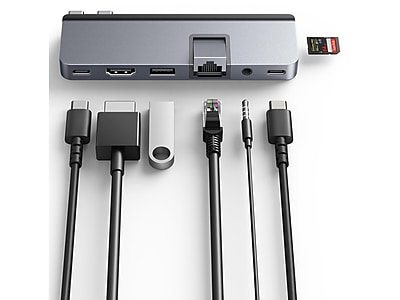
 HyperDrive
DUO 7-in-2 USB-C Hub

Expand your MacBook's capabilities with the HyperDrive DUO 7-in-2 USB-C Hub. This form-fitting hub seamlessly attaches to your MacBook Pro or Air, adding essential ports like Gigabit Ethernet, USB-A, USB-C, and a 3.5mm audio jack. Enjoy stunning 4K 60Hz HDMI output for enhanced visuals and a Thunderbolt 4/USB4 compatible port for high-speed data transfer and power delivery. Its universal compatibility extends to iPads, Chromebooks, and PCs, with extended connectors accommodating protective cases. The magnetic grip ensures a secure connection, making it a versatile accessory for all your devices.
$79.99
Owner Satisfaction
4.0
/ 5
Category Rank
657
/ 824
#657 in Laptop Docking Stations
Price vs Category Average
-62%
Below average
Host Connection
23
/ x USB-C (Thunderbolt compatible)
Who it's for
- Seamless, Flush Design
- Comprehensive Port Variety
- High-Speed Power Delivery
Who should skip it
- Limited Device Compatibility
- Prone to Overheating
- Lack of High-Speed Data Ports
Key Specs
Host Connection
2 x USB-C (Thunderbolt 3 compatible)
HDMI Output
4K @ 60Hz
USB-C Power Delivery
Up to 100W
USB-C Data Port
5Gbps
USB-A Data Ports
2 x 5Gbps
SD Card Slot
UHS-I 104MB/s
MicroSD Card Slot
UHS-I 104MB/s
Material
Aircraft-grade aluminum
Features
- Expands MacBook to 7 essential ports
- Supports 4K 60Hz HDMI output
- High-speed Thunderbolt 4/USB4 connectivity
- 100W Power Delivery pass-through
- Universal compatibility with various devices
- Works with protective cases
- Secure magnetic attachment
- Form-fitting design for MacBooks
What customers say
The HyperDrive DUO 7-in-2 USB-C Hub generally garners a very positive reception from its user base, particularly among MacBook Pro and Air owners. Customers frequently laud its sleek, compact design, which seamlessly integrates with Apple's aesthetic, making it an ideal travel companion. The dual USB-C connector is a standout feature, providing a secure and stable connection that minimizes wobble, a common complaint with single-port hubs. Users appreciate the comprehensive array of ports, including HDMI for external displays, multiple USB-A ports for legacy devices, USB-C Power Delivery for pass-through charging, and convenient SD/microSD card slots. This versatility is often highlighted as a significant advantage, transforming limited laptop ports into a fully functional workstation. However, the sentiment isn't entirely without caveats. A recurring theme in reviews is the hub's tendency to run warm, or even hot, especially under heavy load or during prolonged use with power delivery. While most users report this doesn't impact functionality, it's a point of concern for some. Occasional reports of intermittent HDMI flickering or slower-than-expected SD card speeds also surface, though these appear to be less widespread. The price point is another factor, with some customers finding it a bit steep compared to other hubs on the market, despite acknowledging its premium build and specific design for MacBooks. Despite these minor drawbacks, the overwhelming consensus points to a highly functional, well-designed, and reliable accessory that significantly enhances the connectivity of modern USB-C-only laptops, making it a highly recommended product for its target audience.

Still have a question?
Ask Hayley anything about this product before you decide.