

 TRENDnet
2-Port DisplayPort 1.2 KVM Switch

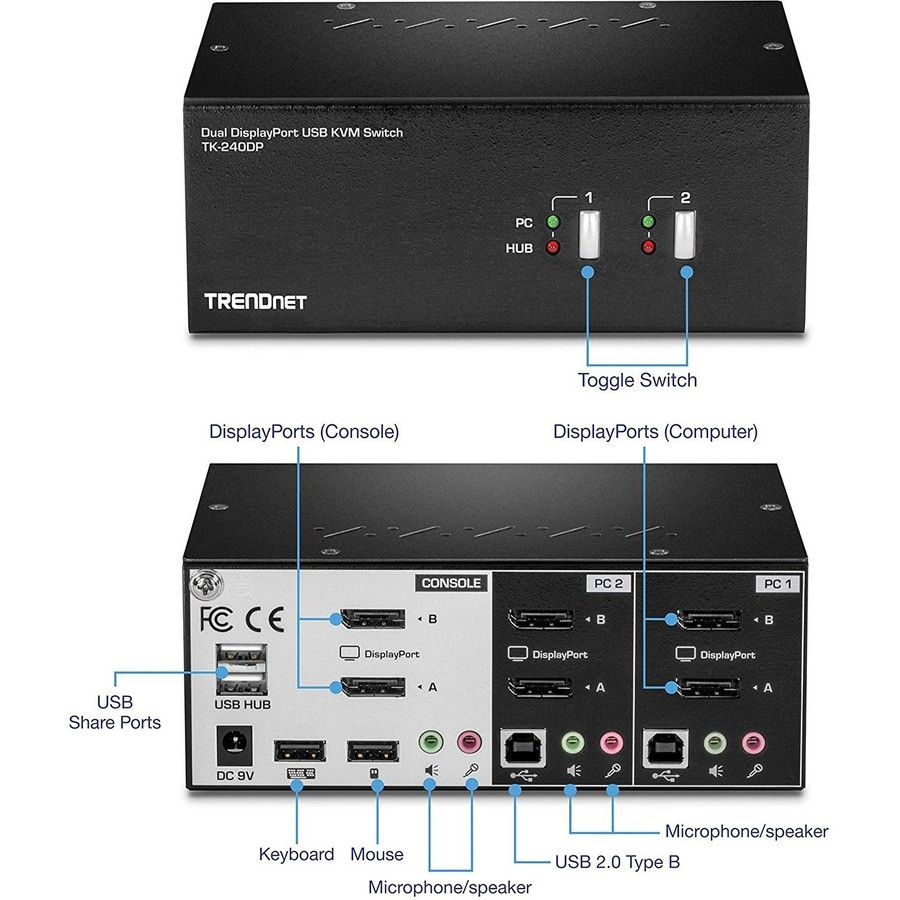
Streamline your dual-monitor setup with the TRENDnet TK-240DP KVM Switch. Effortlessly control two computers using a single set of peripherals and displays. Experience stunning visuals with support for up to 4K UHD resolutions at 60Hz and high refresh rates up to 144Hz. Enhance productivity with the integrated 2-port USB 2.0 hub for sharing printers or storage devices. Enjoy broad compatibility with most keyboards and mice thanks to True Transparent USB emulation, and benefit from full audio support via 3.5mm jacks. Setup is plug-and-play, requiring no driver installation.
$189.99
Owner Satisfaction
3.2
/ 5
Category Rank
1355
/ 1363
#1355 in KVM Switches
Price vs Category Average
-83%
Below average
Maximum video resolution
3840216060
/ x @ Hz
Who it's for
- High-Fidelity Video Support
- Streamlined Workspace
- Integrated Peripheral Hub
Who should skip it
- DisplayPort 1.2 Ceiling
- Potential for Input Lag
- High Cable Quality Requirement
Key Specs
Maximum video resolution
3840 x 2160 @ 60Hz
Refresh rate
Up to 144Hz
KVM ports
2 x DisplayPort 1.2
USB hub
2-port USB 2.0 Type-A
Power input
100 – 240V AC
Power output
9V DC, 2A
Supported monitor count
2
Audio interface
3.5mm Jack
Features
- Control two computers with one console
- Supports high-resolution dual monitors
- Integrated 2-port USB 2.0 hub
- Plug-and-play setup, no drivers needed
- Full audio support with 3.5mm jacks
- Wide keyboard and mouse compatibility
- Switch via front panel or hotkeys
- True Transparent USB (TTU) emulation
What customers say
Customers value the core ability of this KVM switch to consolidate peripherals and displays between two computers, often noting clear video quality when functioning correctly. However, the primary concern centers on reliability and consistency. Many users report significant issues with USB peripheral recognition, experiencing intermittent dropouts for essential devices like keyboards and mice. Furthermore, display stability is frequently compromised, with reports of flickering screens and difficulties maintaining optimal resolutions, especially after sleep mode. The hotkey switching mechanism is often unreliable, forcing reliance on the physical button. Stable operation appears highly dependent on using premium quality cables, which adds an unexpected requirement for users seeking dependable performance.

Still have a question?
Ask Hayley anything about this product before you decide.