

 CableMod
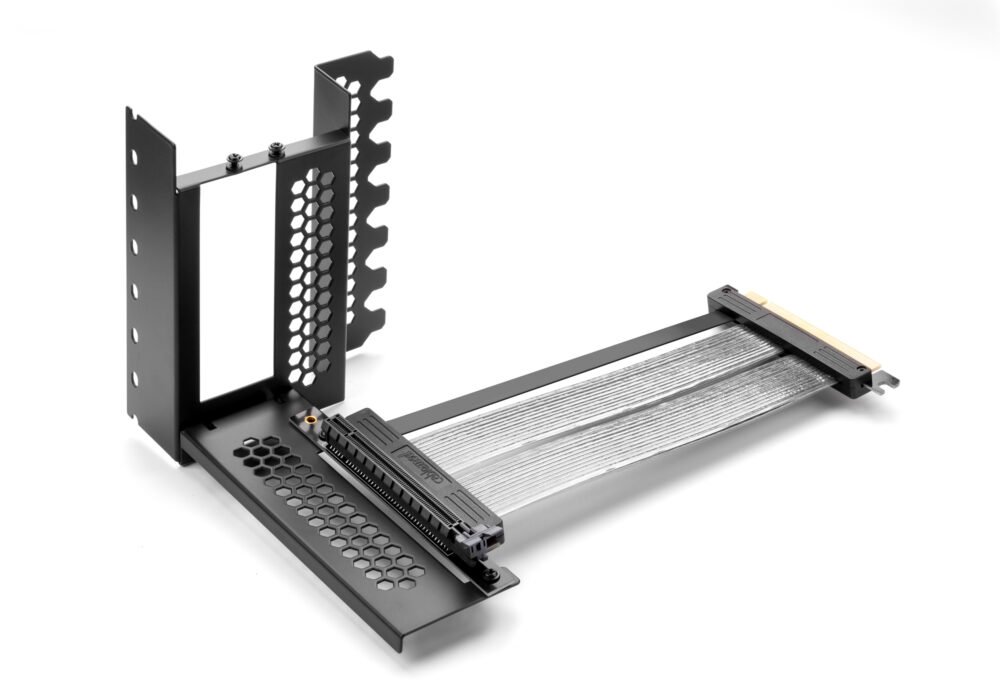
Vertical PCI-e Bracket + Riser Cable Kit

Showcase your high-performance graphics card with the CableMod Vertical PCI-e Bracket. Constructed from solid steel with a quality powder coat finish, this bracket securely mounts any PCI Express card vertically in your case. Installation is fast and requires no case modification, provided you have seven free PCI-e slots. The kit includes a high-speed PCI-e 4.0 riser cable and specialized DisplayPort cables to extend your monitor connections externally. This solution effectively adds 3.1cm of length to your PCI-e card, offering a clean, professional look while ensuring compatibility with standard ATX/mATX builds.
$59.99
Owner Satisfaction
3.6
/ 5
Category Rank
205
/ 219
#205 in Riser Cards
Price vs Category Average
-65%
Below average
PCIe Generation
4.0
/ PCIe
Who it's for
- Enhanced Visual Appeal
- Eliminates GPU Sag
- High-Quality Riser Cable
Who should skip it
- Requires Case Modification/Clearance
- Potential Thermal Restriction
- High Cost Premium
Key Specs
PCIe Generation
PCIe 4.0
Required Slots
7 free PCI-e slots
Extension Added
3.1cm length
Riser Cable Length
210mm
Material
Steel construction with braided nylon jacket
Connector Material
Gold-plated connectors
Maximum Resolution Support
Up to 4K resolution at 60 Hz
Product Dimensions
3.94 x 3.94 x 3.94 inches
Features
- Secure vertical GPU mounting
- No case modification required
- High-speed PCI-e 4.0 data transfer
- Durable all-steel construction
- Elegant powder coat finish
- Supports up to 4K resolution
- External DisplayPort extension cables included
- Quick and easy installation
What customers say
This vertical mounting kit is highly valued for its significant aesthetic upgrade, effectively showcasing expensive graphics cards. Users consistently praise the bracket's robust build quality, noting it provides a very secure mount for heavy GPUs. The visual impact transforms the entire system presentation. However, a key concern involves the riser cable's performance, as some users experience issues with PCIe 4.0 compatibility, often needing to manually revert settings to Gen3 in the BIOS. Case fitment and the premium price point are also mentioned as potential drawbacks. Despite these technical hurdles, those who achieve successful integration find the investment worthwhile for the superior display quality it offers.

Still have a question?
Ask Hayley anything about this product before you decide.