

 Logitech
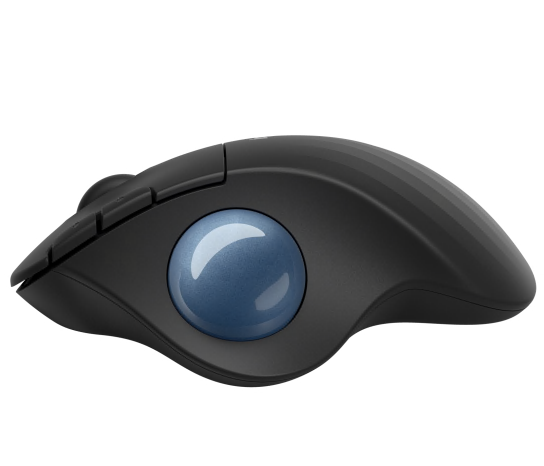
Logitech Ergo M575S Wireless Trackball Mouse
Best ergonomic trackball for professionals working in compact desk spaces.

Experience a more ergonomic workflow with the Logitech Ergo M575 Wireless Trackball Mouse. Designed for exceptional comfort and precision, this trackball mouse promotes a natural hand posture and minimizes arm movement, making it ideal for compact workspaces. Enjoy reliable, lag-free wireless connectivity via Bluetooth or the included USB receiver. Its smooth, responsive tracking ensures accuracy for all your tasks, while the long-lasting battery life keeps you productive throughout the day. The sculpted shape is crafted for all-day comfort, enhancing your computer setup.
$39.99
Owner Satisfaction
4.6
/ 5
Category Rank
61
/ 1705
#61 in Mice & Trackballs
Price vs Category Average
-41%
Below average
Connectivity
2.4
/ Wireless GHz, Bluetooth
Who it's for
- Office workers seeking relief from wrist and forearm strain
- Remote workers with limited desk space or uneven surfaces
- Busy professionals needing reliable, low-maintenance wireless connectivity
Who should skip it
- Traditional mouse users unwilling to adjust their muscle memory
- Users who prefer a low-maintenance, set-it-and-forget-it peripheral
- Graphic designers and gamers requiring high-speed, pixel-perfect precision
Performance breakdown
Ergonomic Comfort
Sculpted shape effectively minimizes wrist strain during extended work sessions.
Space Efficiency
Stationary design eliminates the need for large, clear desk surfaces.
Tracking Precision
Smooth sensor performance handles daily tasks and navigation with ease.
Connectivity Versatility
Seamless switching between Bluetooth and USB receiver offers reliable multi-device flexibility.
Learning Curve
Requires a brief adjustment period for those transitioning from traditional mice.
Battery Longevity
Exceptional power efficiency keeps you productive for months without battery swaps.
Key Specs
Connectivity
Wireless 2.4 GHz, Bluetooth
Compatibility
PC/Mac
Ergonomic design
Hand Orientation
Right-handed
Power Source
Disposable Battery
Device Type
Trackball
Form Factor
Ergonomic
Features
- Ergonomic design for natural hand posture
- Reduces arm movement for tight workspaces
- Wireless connectivity via Bluetooth or USB receiver
- Smooth and responsive tracking
- Long-lasting battery life
- Sculpted shape for all-day comfort
What customers say
The Logitech Ergo M575S earns high praise primarily for its superior comfort and reliable performance. Users consistently report significant relief from wrist and arm strain, attributing this to the natural fit and the intuitive trackball operation that eliminates arm movement. Cursor control is smooth and precise. Connectivity via Bluetooth or the Unifying Receiver is dependable, supported by excellent battery life. While some users find the size slightly less substantial than older models and mention the scroll wheel feels stiff, these minor points do not diminish the overall positive reception. The M575S is widely viewed as an excellent value, successfully delivering strong ergonomic benefits and dependable functionality for both new and experienced trackball users.
Know before you buy
No, it is designed for compact workspaces. Because the cursor is controlled by the thumb-operated ball rather than moving the entire mouse, the device remains stationary on your desk.
The M575S supports dual connectivity via Bluetooth and the included USB receiver, but it does not feature multi-device switching. You will need to toggle between connections or move the receiver if you want to switch between computers.
No, the M575S is specifically sculpted for right-handed use. The ergonomic shape and button placement are optimized for the right hand to ensure natural posture and comfort.
The mouse is powered by a single AA battery. Thanks to its efficient power management, a single battery can last up to 24 months depending on usage.
The mouse is plug-and-play and will work immediately upon connection. However, you can download Logitech’s software if you wish to customize the button functions to better suit your workflow.
It is quite simple. You can easily pop the ball out from the bottom of the device using a pen or your finger to wipe away dust or debris from the sensor and the internal support rings.

Still have a question?
Ask Hayley anything about this product before you decide.