


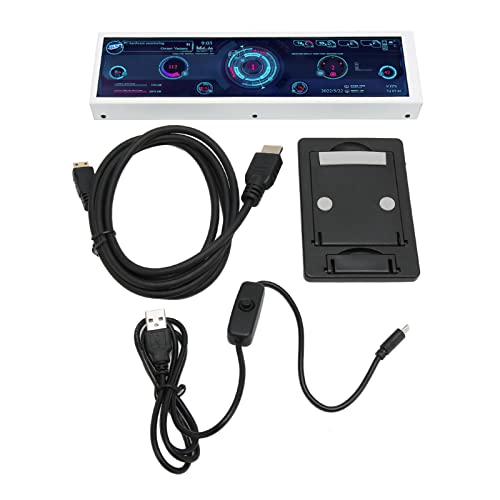
PC Sensor Panel Display
Best secondary display for PC enthusiasts tracking real-time system performance.

Enhance your PC monitoring with this external expansion display. Designed as a secondary screen, it provides an easy, at-a-glance view of critical system data like CPU hardware temperatures. This specialized monitor is perfect for PC enthusiasts seeking to track performance without interrupting their workflow. It ensures efficient oversight of your system's health and operational status, keeping you informed and in control. Easily view crucial system data and monitor hardware temperatures in real-time.
$117.65
Owner Satisfaction
4.1
/ 5
Category Rank
3490
/ 3744
#3490 in Computer Monitors
Price vs Category Average
-81%
Below average
Screen Size
8.8
/ inches
Who it's for
- Gamers needing instant hardware stats without interrupting gameplay
- PC modders wanting a personalized, aesthetic desktop setup
- Builders looking for a quick, plug-and-play hardware upgrade
Who should skip it
- Users uncomfortable with technical software setup and configuration
- Performance-focused gamers minimizing background resource usage
- Visual perfectionists requiring high-fidelity, color-accurate displays
Performance breakdown
Display Clarity
Crisp resolution makes reading small system metrics effortless at a glance.
Installation Ease
Requires some technical patience to configure software and mount properly.
Form Factor
Compact 8.8-inch footprint fits perfectly inside most modern PC cases.
Software Compatibility
Relies on third-party monitoring tools which can be finicky to set up.
Real-time Responsiveness
Refresh rates are snappy enough for instant hardware temperature tracking.
Build Quality
Functional chassis design that prioritizes utility over premium aesthetic materials.
Key Specs
Screen Size
8.8 inches
Manufacturer
Pomya
Part #
Pomyaom2pu1yd79
Category
Hardware Monitor Display
Know before you buy
This 8.8-inch display acts as a dedicated secondary monitor specifically for system telemetry. It is designed to show real-time data such as CPU and GPU temperatures, fan speeds, and other hardware performance metrics, keeping that information visible without cluttering your main desktop.
Yes, you will typically need to use third-party monitoring software like AIDA64 or similar sensor-tracking applications to feed data to the display. The screen itself functions as a monitor, so the software handles the layout and the data visualization.
The device connects via standard display cables, typically HDMI or USB-C, depending on your specific setup. It is treated by your operating system as a secondary monitor, allowing you to drag windows or monitoring dashboards onto it just like a standard screen.
Technically, yes. Because it functions as a standard secondary display, you can drag any application, video, or window onto it. However, its aspect ratio and size are optimized for dashboard-style monitoring rather than general desktop use.
The display is external, so it does not require a specific case type for mounting. You can place it on your desk next to your keyboard or mount it externally, provided you have the necessary cable length and desk space.

Still have a question?
Ask Hayley anything about this product before you decide.