

 Microsoft
Microsoft Adaptive Joystick Button
Best customizable input solution for gamers with limited mobility.

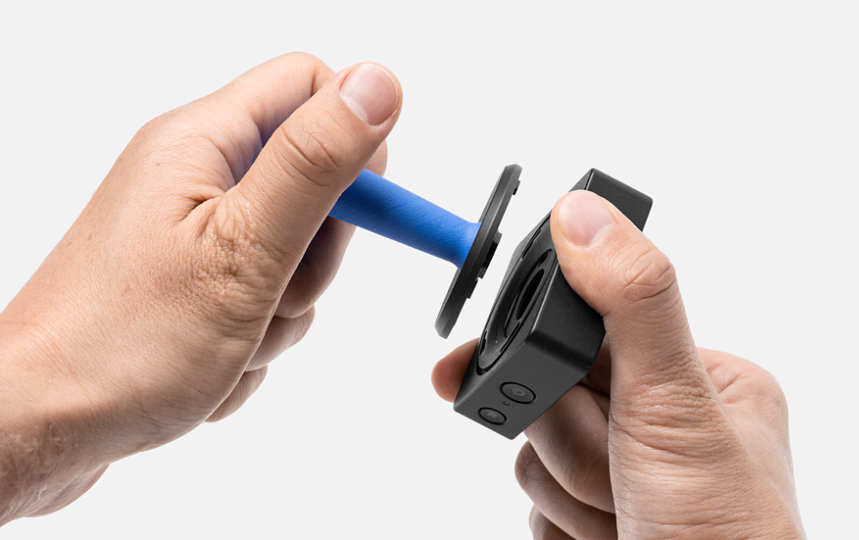
The Microsoft Adaptive Joystick Button is an innovative wireless accessory designed to enhance accessibility for PC and phone users. This button features eight digital inputs and an easy-to-press design, simplifying complex tasks. It connects wirelessly to the Microsoft Adaptive Hub, sold separately. Users can create sequence macros to streamline operations and customize the button with 3D-printable replacement parts for a personalized experience. This accessory is part of the Microsoft Adaptive Accessories line, focusing on customizable solutions.
$42.00
Owner Satisfaction
4.7
/ 5
Category Rank
3
/ 221
#3 in Game Controller Accessories
Price vs Category Average
+10%
Above average
Material
Hard Plastic
/ Hard Plastic
Who it's for
- Gamers with limited motor control or dexterity
- Players needing personalized control layouts and input configurations
- Users already invested in the Xbox or Windows accessibility ecosystem
Who should skip it
- Shoppers looking for a plug-and-play standalone controller
- Players requiring complex, multi-button inputs for advanced gaming
- Budget-conscious buyers building a comprehensive adaptive setup
Performance breakdown
Accessibility Integration
Seamlessly bridges the gap for users requiring specialized input methods.
Customization Depth
3D-printable parts offer unparalleled personalization for unique physical needs.
Macro Versatility
Simplifies complex gaming sequences into single, effortless button presses.
Ergonomic Design
Large, responsive surface area minimizes strain during extended gaming sessions.
System Connectivity
Wireless performance is reliable but strictly dependent on the Adaptive Hub.
Input Versatility
Eight digital inputs provide robust control options for diverse gaming genres.
Key Specs
Material
Hard Plastic
Programmable Buttons
Yes
Adjustable
Yes
Connectivity
Wireless
Input
Eight digital inputs
Requires
Microsoft Adaptive Hub (sold separately)
Compatible Controller Platform
PC/Steam Deck
Features
- Easy-to-press design for comfortable use
- Create sequence macros for complex tasks
- Customize with 3D-printable parts
- Wireless connection via Adaptive Hub
- Eight digital inputs for versatile control
- Enhances PC and phone accessibility
- Part of the Adaptive Accessories line
- Supports macro creation for task simplification
What customers say
Customer sentiment centers on the exceptional accessibility and customization offered by the Microsoft Adaptive Joystick Button. Users deeply appreciate Microsoft's commitment to inclusivity, noting this modular system provides a reliable input method when standard controllers fail. Reviewers consistently praise the button's excellent tactile feedback and robust build quality. Its plug-and-play functionality allows for quick, personalized setups matching specific physical requirements. This adaptability is frequently described as revolutionary, making digital environments accessible again. While the complete setup cost is sometimes mentioned, the profound functional value and high quality of this thoughtfully engineered component overshadow those concerns. It is considered essential for regaining control.
Know before you buy
Yes, this button requires the Microsoft Adaptive Hub to function. The hub acts as the wireless bridge between the button and your PC or phone.
Absolutely. The button is designed to be personalized with 3D-printable parts, allowing you to swap out the top for a shape or texture that better suits your specific accessibility needs.
The eight inputs allow you to map specific functions or complex sequence macros. This helps simplify multi-step tasks into a single press, making navigation or gameplay much more efficient.
The Microsoft Adaptive Joystick Button is specifically designed for use with PC and phone platforms. It is not compatible with Xbox or PlayStation consoles.
The button connects wirelessly to the Microsoft Adaptive Hub. Once paired, the hub translates those inputs to your device, ensuring a clean, cable-free setup on your desk.

Still have a question?
Ask Hayley anything about this product before you decide.
Ready to buy?
$42