

 IOGEAR
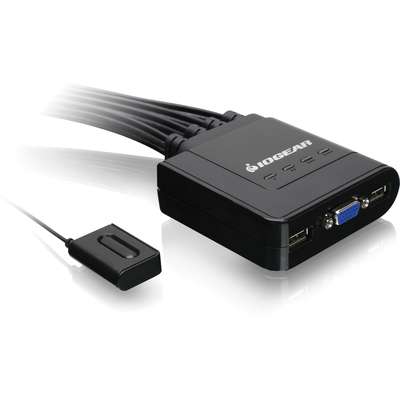
IOGear 4-Port USB VGA Cable KVM Switch

The IOGEAR GCS24U is an efficient 4-Port USB Cable KVM switch, perfect for streamlining your workspace by managing four computers with a single VGA monitor, USB keyboard, and mouse. It offers an immediate, out-of-box solution featuring 4-foot molded-in cables, eliminating the need for extra purchases. Switching is simple via a convenient 6-foot remote controller cable that sits on your desk. This unit is entirely plug-and-play, supporting Windows, Mac, and Sun operating systems without requiring any software drivers. Furthermore, it operates solely via USB bus power, meaning no external power adapter is necessary for operation.
$60.31
Owner Satisfaction
3.9
/ 5
Category Rank
1165
/ 1363
#1165 in KVM Switches
Price vs Category Average
-94%
Below average
Video Resolution Support
204815362
/ x, DDCB
Who it's for
- Integrated Cabling
- Affordable Solution
- Convenient Switching Methods
Who should skip it
- Legacy VGA Standard
- Fixed Cable Length
- Limited USB Peripheral Support
Key Specs
Video Resolution Support
2048x1536, DDC2B
Dimensions
Height: 7.88 in., Width: 6.38 in., Depth: 2.38 in.
Weight
1.7 lbs. (0.77 kg.)
Monitor Connectors (CPU)
4 x HBD-15 Male
Console Monitor Connector
1 x HBD-15 Female
Cable Length
4 ft. (Molded-in)
Port Selection Method
Push Button
Power Supply
Powered through the USB bus
Features
- Control four computers with one set of peripherals
- Molded-in 4' cables simplify initial setup
- Easy computer selection via remote controller cable
- Plug-and-play support for major operating systems
- USB bus powered; no external power supply needed
- Supports high video resolutions up to 2048x1536
- Full compatibility with Mac keyboards and programmable mice
What customers say
This KVM switch earns praise primarily for its simplicity and value. Users appreciate the straightforward plug and play setup and integrated cables that effectively reduce desktop clutter, making it ideal for basic home office needs. It reliably handles switching between a few computers for standard productivity tasks, offering excellent affordability. However, performance consistency is a noted drawback. Some users report occasional issues with peripheral recognition, sometimes requiring a manual reconnection of specialized keyboards or mice. While video quality is generally acceptable, minor signal degradation can occur. Overall, this device is a functional, budget-friendly choice best suited for users prioritizing ease of use and low cost over advanced peripheral support or long term heavy duty reliability.

Still have a question?
Ask Hayley anything about this product before you decide.