

 Icom
Icom
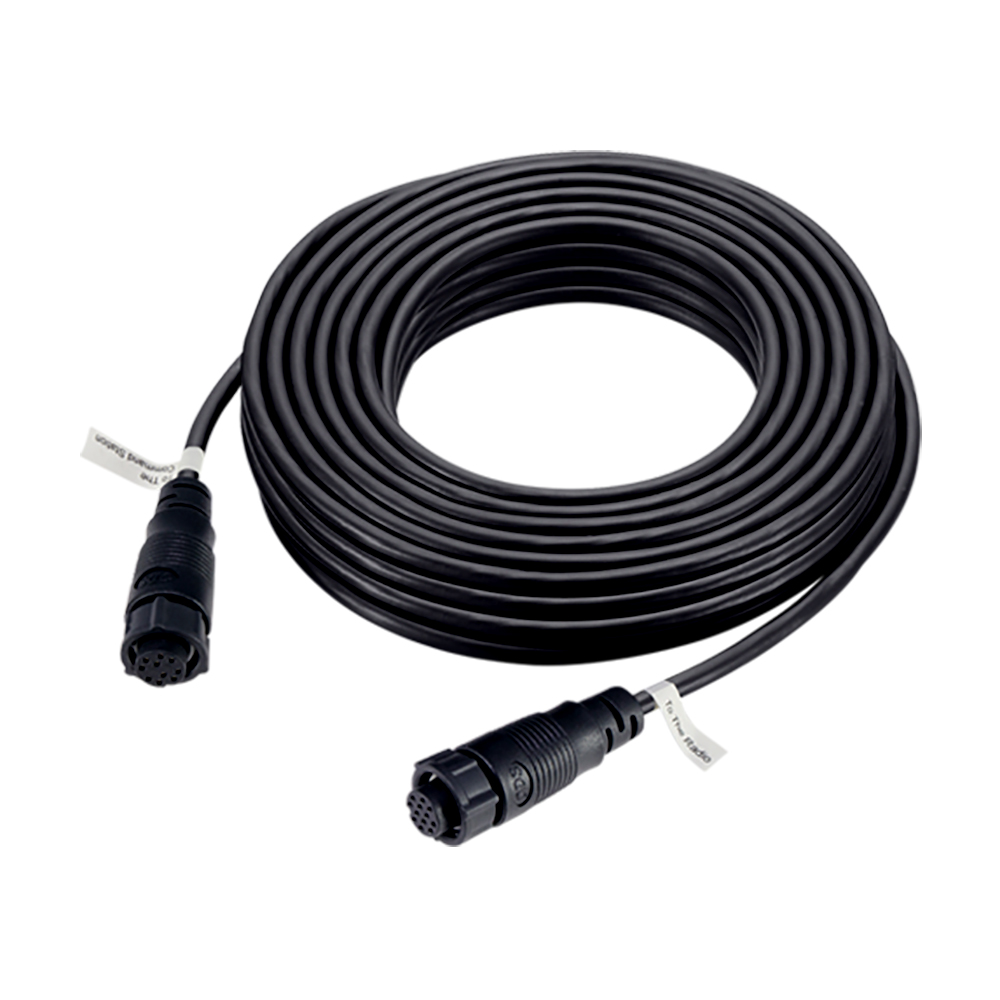
Icom Conversion Cable to Program M605
Best essential tool for marine radio technicians and boat owners.

Ensure seamless programming for your Icom M605 radio with this genuine conversion cable. Designed to link the OPC478UC interface directly to your radio, this accessory from authorized dealer BOE Marine simplifies software updates and configuration changes. It's an essential component for maintaining and setting up your marine communication systems, offering reliable connectivity for your Icom equipment. Trust this authentic Icom accessory for dependable performance within your vessel's electronics suite.
$32.50
Owner Satisfaction
4.5
/ 5
Category Rank
284
/ 1072
#284 in Communication Radio Accessories
Price vs Category Average
-67%
Below average
Type
Cables
/ Cables
Who it's for
- Technicians performing essential firmware and security maintenance
- Power users needing deep customization and channel management
- Radio owners prioritizing reliable, manufacturer-guaranteed connectivity
Who should skip it
- Budget-conscious buyers seeking affordable third-party alternatives
- Users wanting a plug-and-play solution without extra software
- Generalists looking for a versatile, multi-purpose data cable
Performance breakdown
Compatibility Precision
Engineered specifically for the M605 to ensure a perfect handshake.
Build Integrity
Genuine Icom construction stands up to demanding marine environment requirements.
Setup Simplicity
Direct interface connection makes radio configuration straightforward and hassle-free.
Data Reliability
Maintains stable signal integrity during critical software updates and programming.
System Integration
Seamlessly bridges the OPC478UC interface into your existing marine electronics suite.
Maintenance Efficiency
Streamlines routine radio updates to keep your communication systems current.
Key Specs
Type
Cables
Brand
Icom
Weight
0.1 lb
Accessory Type
Cable/Adapter
Compatible Radio Type
Marine Radio
Frequency Band
Marine Band
Features
- Programs Icom M605 radio
- Connects OPC478UC to M605
- Enables radio configuration
- Genuine Icom accessory
- Facilitates software updates
- Ensures reliable connectivity
What customers say
Users overwhelmingly confirm this Icom Conversion Cable flawlessly executes its core function, ensuring a stable connection for vital M605 radio programming and updates. The genuine Icom build quality provides expected durability, making it an indispensable tool for serious marine communication maintenance. While the cable delivers reliable, high quality performance, the primary friction point is its high cost and proprietary nature. Customers accept the necessary purchase because guaranteed programming capability is nonnegotiable for mission critical marine electronics. Despite the steep price, the essential functionality and build quality justify the investment for maintaining top tier radio performance.
Know before you buy
Yes, this conversion cable is designed to bridge the connection between your radio and the Icom OPC478UC programming interface. You will need the OPC478UC cable and the appropriate Icom programming software to complete the setup.
This specific conversion cable is engineered specifically for the M605 series. While it may look similar to other Icom adapters, it is optimized for the M605's specific pin configuration and should not be used with other models.
Genuine Icom accessories are manufactured to exact tolerances to ensure consistent data transfer and prevent connection errors. Using an authentic cable minimizes the risk of communication failures during critical software updates or configuration changes.
Yes, this cable facilitates both firmware updates and channel configuration. It provides the necessary link to allow your computer to communicate directly with the radio's internal system.
The cable itself is a physical adapter, but the OPC478UC interface it connects to will require the standard Icom USB drivers installed on your computer. Ensure your drivers are up to date to maintain a stable connection during the programming process.

Still have a question?
Ask Hayley anything about this product before you decide.