

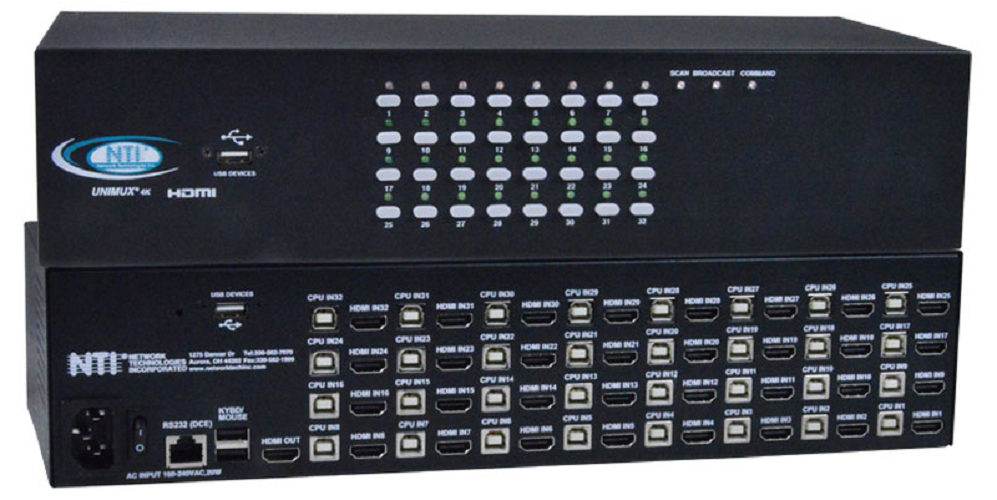
NTI unimux-hd4k-32 4K HDMI USB KVM Switch
Best high-density switch for managing large-scale professional server environments.

The NTI UNIMUX HDMI USB KVM Switch empowers users to manage up to 32 Ultra-HD computers from a single 4K console. It ensures error-free booting with constant peripheral emulation and supports resolutions up to 4Kx2K at 30Hz. Enjoy flexible control via hotkeys, OSD, front panel, or RS232. This switch also features transparent USB 2.0 ports for additional devices like printers or flash drives, all within a robust, rackmountable steel construction. Interface cables are required but not included.
$3937.60
Owner Satisfaction
4.5
/ 5
Category Rank
114
/ 1363
#114 in KVM Switches
Price vs Category Average
+262%
Above average
Port Count
32
Who it's for
- IT administrators managing large server racks or workstation clusters
- Designers and editors requiring high-fidelity visual output
- Enterprise teams needing dependable, mission-critical hardware
Who should skip it
- Home office users on a limited budget
- Remote workers with limited desk or rack space
- Users seeking a simple, plug-and-play setup experience
Performance breakdown
Port Density
Managing 32 computers from one console is ideal for dense server environments.
Video Fidelity
Supports 4K resolution, though the 30Hz refresh rate limits high-motion tasks.
Build Integrity
Rugged steel chassis ensures long-term reliability in demanding rackmount installations.
Peripheral Versatility
Transparent USB 2.0 ports provide seamless connectivity for essential external hardware.
Control Flexibility
Multiple switching methods offer convenient management options for any professional workflow.
System Compatibility
OS-independent operation guarantees smooth integration across diverse computing platforms.
Key Specs
Port Count
32
Video Interface
HDMI 1.4, HDCP 1.4 compliant
Maximum Resolution
3840x2160 at 30Hz
Dimensions (Without Rackmount Kit)
15.32 x 6.82 x 3.5 inches (389 x 173 x 88 mm)
Power Input
110 or 220 VAC at 50 or 60 Hz via IEC connector
USB Ports
Two USB 1.1 Type A (K/M), Two USB 2.0 Type A (Devices)
Operating Temperature Range
32°F to 100°F
Certifications
CE, ROHS, TAA Compliant
Features
- Control 32 computers from one console
- Supports Ultra-HD 4Kx2K video resolution
- Ensures error-free computer booting
- Flexible control options (hotkeys, OSD, RS232)
- Includes transparent USB 2.0 ports
- Rackmountable design for professional setups
- OS and software-independent operation
- Durable steel construction
What customers say
Users consistently highlight the NTI unimux hd4k 32 for its exceptional reliability and robust build quality, crucial for managing many high resolution displays. The 4K video switching is flawless, preserving signal integrity across all 32 ports without any lag or visual issues. Although the initial investment is substantial, the professional grade performance fully justifies the cost for mission critical needs. The core feedback centers on dependable, enterprise level functionality that operates exactly as expected, providing peace of mind for demanding environments.
Know before you buy
No, the interface cables are not included with the switch. You will need to purchase the appropriate HDMI and USB cables separately to connect your 32 computers.
Yes, the unit features transparent USB 2.0 ports specifically designed to support additional peripherals like printers, flash drives, or other USB devices alongside your keyboard and mouse.
The switch supports Ultra-HD resolutions up to 4Kx2K (3840x2160) at a 30Hz refresh rate. It is also fully HDCP 1.4 compliant for protected content.
You have several flexible control methods, including keyboard hotkeys, the on-screen display (OSD) menu, the front panel push buttons, or RS232 serial control.
Yes, the device is OS and software-independent. Because it handles switching at the hardware level, it will function with any operating system without requiring specific drivers.
No, this model does not support hot-plugging. It is designed to ensure error-free booting through constant peripheral emulation, so it is best to have your devices connected before powering on the system.

Still have a question?
Ask Hayley anything about this product before you decide.