


 Wacom
Wacom
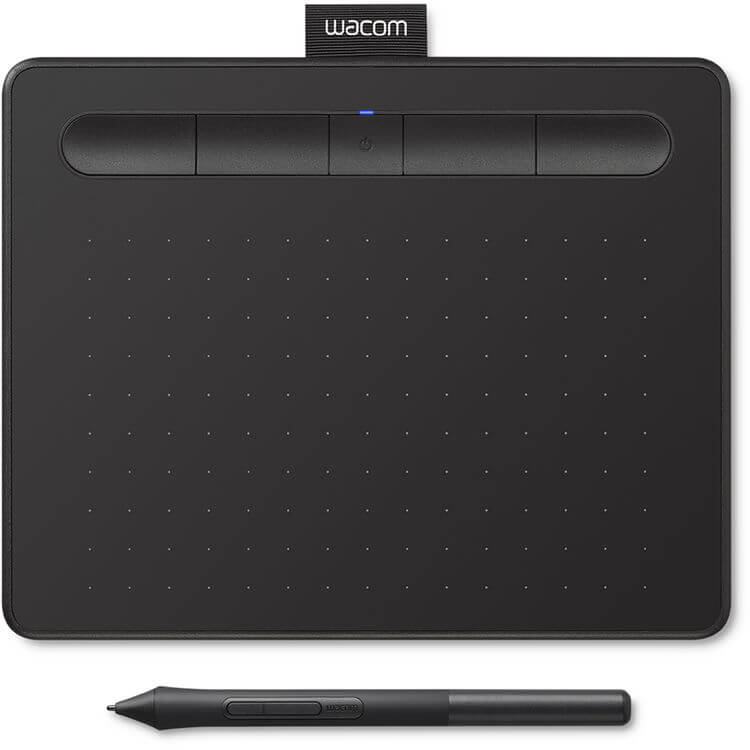
Wacom Intuos Pro Pen & Touch Tablet Medium
Best professional tablet for digital illustrators and photo editors.

Streamline your creative workflow with the Wacom Intuos Pro Pen & Touch Tablet Medium. Designed for detailed illustrations, designs, and photo editing, it features a 10.4 x 5.8" active area with a 16:9 aspect ratio, perfectly matching modern monitors. The included Wacom Pro Pen 3 offers 8192 levels of pressure sensitivity and 60° tilt support, requiring no charging. Customizable ExpressKeys and two radial dials enhance productivity, while Bluetooth 5.3 provides wireless freedom or a stable connection via USB-C. The internal battery offers up to 16 hours of use.
$379.95


Owner Satisfaction
4.6
/ 5
Category Rank
4
/ 125
#4 in Graphics Tablets
Price vs Category Average
-27%
Below average
Active Area
10.45.8
/ x in
Who it's for
- Designers needing a reliable, high-quality workspace centerpiece
- Professional illustrators requiring precise, natural pen control
- Digital artists seeking faster, more efficient creative workflows
Who should skip it
- Artists looking to avoid recurring maintenance and supply costs
- Budget-conscious hobbyists or students starting their creative journey
- Users who prefer reliable, distraction-free input methods
Performance breakdown
Pen Precision
Industry-leading pressure sensitivity delivers an incredibly natural and responsive drawing experience.
Workflow Efficiency
Customizable ExpressKeys and radial dials keep essential tools at your fingertips.
Build Quality
The magnesium chassis feels premium, durable, and built for daily professional use.
Connectivity Versatility
Seamless switching between stable USB-C and wireless Bluetooth 5.3 freedom.
Ergonomic Design
Slim profile and ambidextrous layout ensure comfort during long creative sessions.
Battery Endurance
Sixteen hours of wireless use covers most full-day professional creative workflows.
Key Specs
Active Area
10.4 x 5.8 in
Pressure Levels
8192
Tilt Angle (Maximum)
60 degrees
Number of Shortcut Keys
10
Multi-touch Support
Yes
Pen Technology
Battery-Free EMR
Connectivity
Bluetooth 5.3 or USB-C
Operating System Compatibility
Windows 10 or macOS 13 or later
Features
- Exceptional pen precision with 8192 pressure levels
- Customizable ExpressKeys and radial dials for efficiency
- 16:9 aspect ratio for modern monitor compatibility
- Sleek, durable magnesium build for portability
- Wireless Bluetooth 5.3 connectivity
- Pen requires no charging
- Supports multi-touch gestures
- Ambidextrous design for all users
What customers say
Users consistently praise the Wacom Intuos Pro Medium for its exceptional build quality and professional reliability. Artists find the pen sensitivity and precision dramatically improve their workflow, making complex tasks feel intuitive. While the price point is high, users feel the investment is justified by the tablet's durability and seamless integration into creative software. This device is widely regarded as the industry standard for serious digital art creation.
Know before you buy
No, the pen uses battery-free EMR technology, meaning it never needs to be charged or paired. It is always ready to use the moment you bring it near the tablet surface.
You have the flexibility to use it either way. It features Bluetooth 5.3 for a wireless connection with up to 16 hours of battery life, or you can connect it via USB-C for a wired, stable connection.
The 10.4 x 5.8-inch active area features a 16:9 aspect ratio, which is designed to map perfectly to modern widescreen monitors. While it works well with dual setups, you can easily customize the mapping settings in the Wacom driver to focus on one screen or span across both.
Yes, the tablet features 10 customizable ExpressKeys and radial dials. You can program these shortcuts to perform your most-used functions in specific applications like Photoshop, Illustrator, or Clip Studio Paint.
Yes, the Intuos Pro supports multi-touch gestures, allowing you to pan, zoom, and navigate your canvas using your fingers, similar to a trackpad, alongside your pen input.
Absolutely. The tablet features an ambidextrous design, allowing you to rotate it 180 degrees and adjust the orientation settings in the software to accommodate left-handed use comfortably.

Still have a question?
Ask Hayley anything about this product before you decide.