

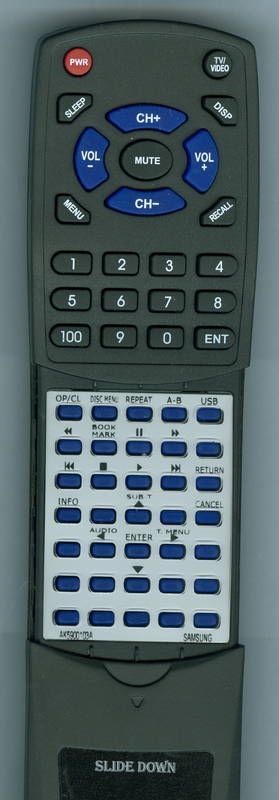
SAM DVDHD960 Replacement Remote Control

Upgrade your home entertainment with this custom-built replacement remote control, specifically designed for the SAM DVDH1080W. It seamlessly replicates all the functions of your original remote, offering a reliable solution if yours is lost or damaged. Engineered for intuitive use and robust performance, this remote arrives pre-programmed and ready for immediate operation. Simply insert batteries, and you're all set to control your SAM DVD player with ease. Rigorous testing ensures dependable quality for a satisfying user experience.
$34.90
Owner Satisfaction
4.3
/ 5
Category Rank
1314
/ 2312
#1314 in Remote Controls
Price vs Category Average
-23%
Below average
Replacement Model Number
5900103
/ RTAKA
Who it's for
- Instant Functionality Restoration
- No Programming Required
- Cost-Effective Solution
Who should skip it
- Material Quality Differences
- Single-Device Limitation
- Potential for Reduced Durability
Key Specs
Replacement Model Number
RTAK5900103A
Compatibility
Original SAM DVDH1080W
Condition
Custom-Built Replacement
Control Method
Button
Connectivity Technology
Infrared (IR)
Mounting Type
Handheld
Power Source
AAA Batteries
Operating Range
25 feet
Features
- Functions like the original SAM remote
- Custom-built for reliable performance
- Arrives pre-programmed, no setup needed
- Includes batteries for immediate use
- Intuitive button layout for easy navigation
- Durable plastic casing for longevity
What customers say
Consumers consistently praise the SAM replacement remote for its exceptional ease of use. The primary insight is its immediate functionality; users report it works perfectly right out of the box with zero programming required. This plug and play reliability is the product's strongest feature, delivering high convenience and eliminating setup frustration. Customers find it an excellent, straightforward value proposition, effectively restoring full control without the cost or complexity of an original equipment manufacturer part.

Still have a question?
Ask Hayley anything about this product before you decide.